VOOZH about

URL: https://www.geeksforgeeks.org/java/spring-boot-integrating-hibernate-and-jpa/

⇱ Spring Boot - Integrating Hibernate and JPA - GeeksforGeeks


  • Courses
  • Tutorials
  • Interview Prep

Spring Boot - Integrating Hibernate and JPA

Last Updated : 9 Apr, 2026

Spring Boot simplifies application development by providing auto-configuration and reducing setup effort. It easily integrates with Hibernate and JPA to handle database operations efficiently. This allows developers to focus more on business logic rather than configuration.

  • Automatically sets up Hibernate and JPA with minimal setup
  • Uses repositories like JpaRepository for CRUD operations
  • Works with multiple databases using JPA abstraction

Step-by-Step Implementation of Integrating Hibernate and Jpa

Step 1: Create a Spring Boot Project

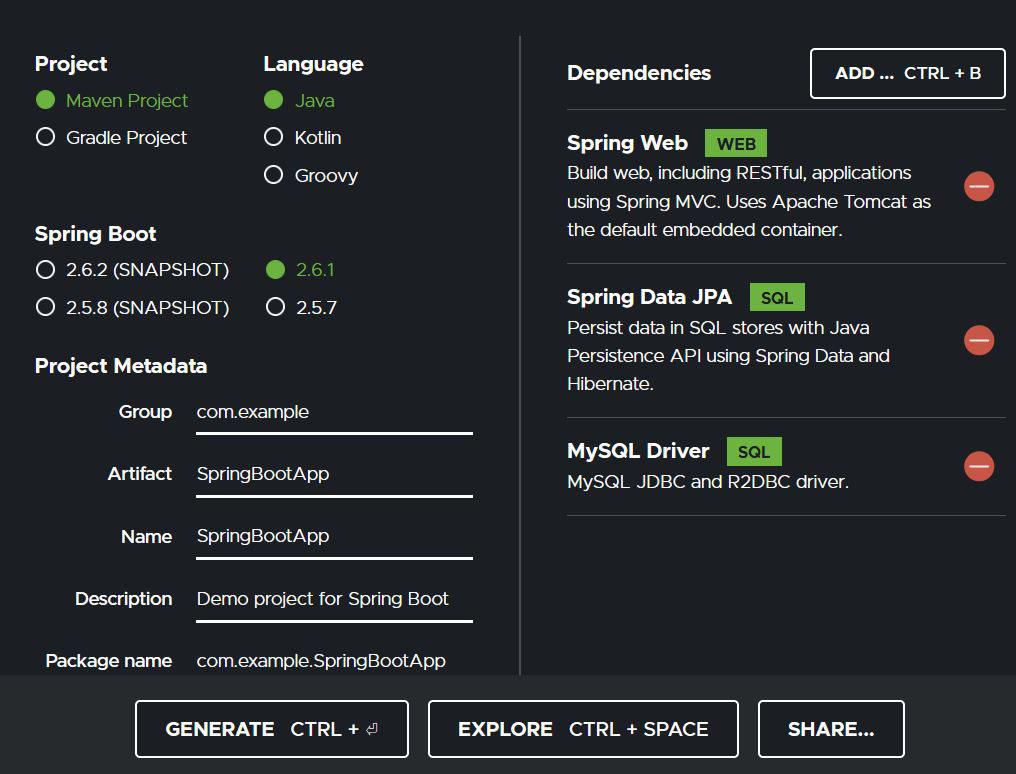
1. Go to
2. Fill in the project details (Group, Artifact, Name, Java Version, etc.)
3. Add the following dependencies:

  • Spring Web
  • Spring Data JPA
  • MySQL Driver

Click Generate to download the starter project.

👁 Image

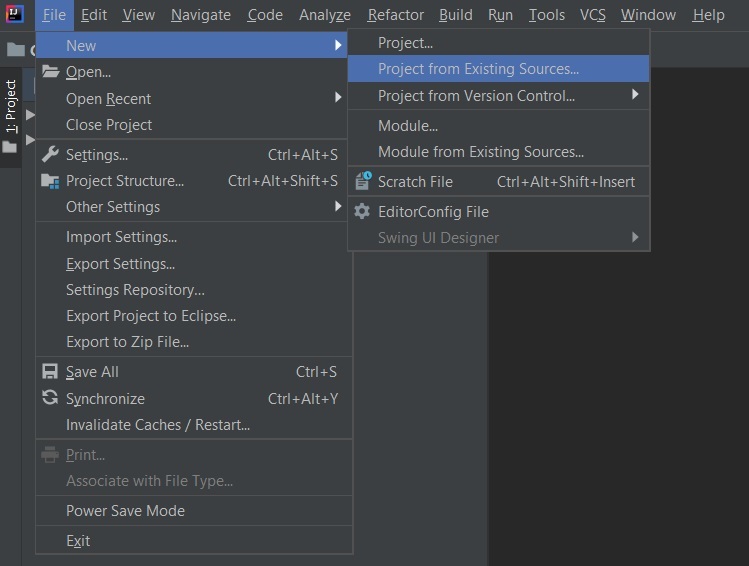
Step 2: Import the Project in IDE

  • Extract the downloaded zip file
  • Open your IDE (IntelliJ IDEA or Eclipse)
  • Go to File ->New ->Project from Existing Sources
  • Select the project folder and pom.xml
  • Click Import Changes when prompted
  • Make sure the JDK version matches the one used during project creation
👁 Image

pom.xml file:

Note: In the Import Project for Maven window, make sure you choose the same version of JDK which you selected while creating the project.

Step 3: Configure Database in application.properties

Configuring the Spring application with the database:

application.properties file:

spring.datasource.url=jdbc:mysql://localhost:3306/user

spring.datasource.username=root

spring.datasource.password=Aayush

spring.jpa.hibernate.ddl-auto=update

Step 4: Run the Spring Boot Application

  • Open the main application class (SpringBootAppApplication.java)
  • Run the application

If configured correctly, Spring Boot will start, connect to the MySQL database and prepare for JPA entity operations.

👁 Image
Comment
Article Tags: